
BittWare WaveBox-119
AMD Versal RF with 16x16 Analog I/O and 800+ Gbps Digital I/O

Versal RF

Preliminary Product Concept
This is an preliminary product concept, which means the specifications, pricing, and availability are subject to change. Get in touch with us to learn about the expected availability and a price quote.
Our Direct RF Products
RFX-880
4 ADCs + 4 DACs w/400G I/O
Optional Integrated Nyquist Filter/Amp
RFX-770
4 ADCs + 4 DACs w/ PCIe Gen4 x8x8
Optional Integrated Nyquist Filter/Amp
WaveBox RFSoC
1U Enclosure w/ up to 3x RFX-880
2U Dual CPU w/up to 2x RFX-770
WaveBox Versal RF
1U Enclosure 16x16 analog I/O on a single Versal RF chip

Amplify, Filter and Digitize All in One Box
A Compact, COTS Approach to Direct RF
WaveBox-119 builds on our experience with TeraBox (our FPGA-focused servers) to bring COTS to direct RF at a server level. The BittWare WaveBox-119 provides all of the following in a 1U chassis:
- Integrated amplification and filtering for higher performance and reduced cost
- 16x ADCS and 16x DACs to the AMD Versal RF chip
- Up to 900 Gbps of digital I/O bandwidth via rear I/O ports
Powered by AMD Versal RF
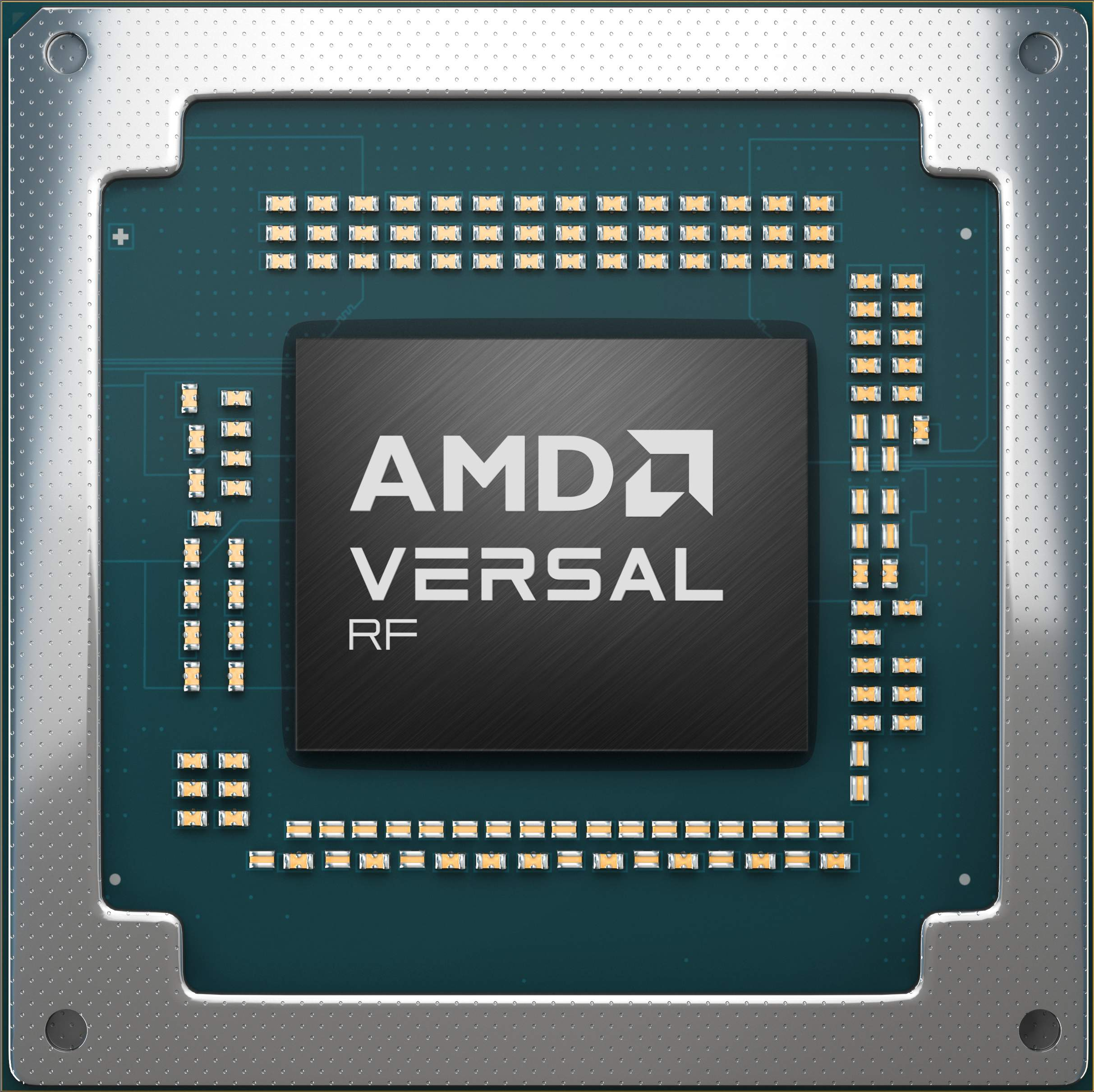
WaveBox-119 is built around the powerful AMD Versal RF VR1902 device. We bring analog signals in, but it’s the direct RF chip approach that packs so much analog and digital functionality that many racks of previous equipment are no longer necessary!
- 通过消除JESD204接口来降低功率
- Smaller physical space
- Programmable (FPGA) logic for diverse requirements and emerging standards
- Built-in ARM processing lets you do more in a standalone deployment
ADC Front End Options
Choose from on-card filtering and amplification targeting 1st Nyquist , or choose an unamplified build option and bring your own external filtering. Here’s the input ADC:
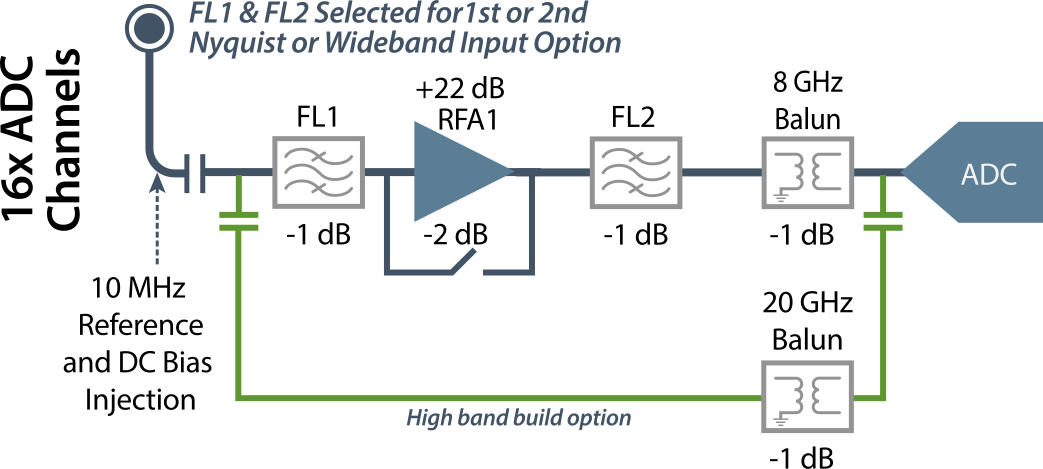
The front end is optimized for 1st Nyquist: 500 MHz to 3.5 GHz on the ADC side, and 500 MHz to 7.5 GHz on the DAC side. The transmit side diagram is below:
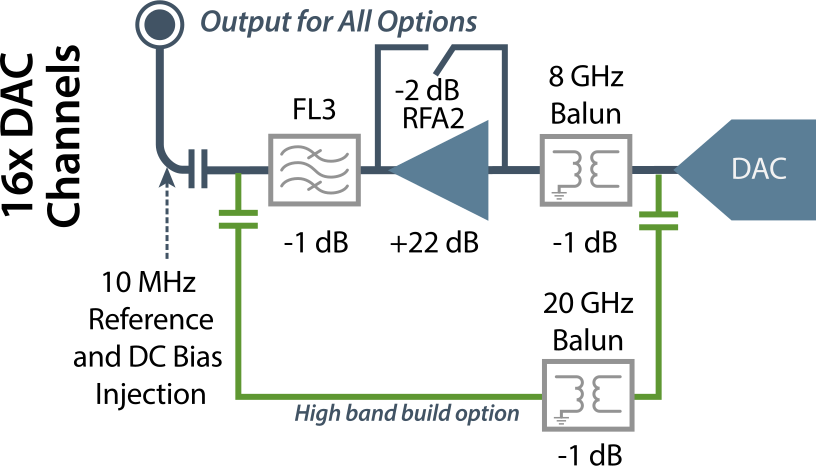
An option is available for an amplified, 2nd Nyquist configuration on selected ADC channels using different filters. We can also replace the filters with 0.5 dB Thru-Line attenuators if a user prefers to filter before signals reach the WaveBox-119.
Processing signals above 8 GHz is possible, depending on customer interest. This option leverages the green signal path in the diagrams above, using the same high band balun as our VRF-319 3U VPX defense product. Please contact us for details.
Where WaveBox Fits
Processing analog RF used to require large, bulky equipment. For many applications, from Satcom to Quantum computing, much of this equipment has been reduced to a single chip, the revolutionary AMD Versal RF. However, there remains equipment like downconverters, amplifiers, and filtering that can take up space and add complexity.
That’s where we have brought in WaveBox-119, an RF system with built-in amplification and filtering in a single chassis. The WaveBox-119 is built from a COTS perspective—taking advantage of higher volume standard modules, avoiding ruggedized form factors, and yet retaining high performance in the critical analog signal path.
Analog Features
Up to 16x ADCs and DACs per 1U
High analog port density
Built-in Amplifier/Filter
Configure module to use your own filtering, or choose our built-in 1st Nyquist amplifier + filter
Digital Features
Up to 900 Gb/s digital bandwidth per 1U
Whether you need CPU-based or standalone architectures, WaveBox-119 gives you a digital bandwidth advantage
Ecosystem of Partner IP
Getting data formatted, encrypted, and recorded to disk can involve significant development time using specialist firmware engineers. Reduce your time to market by using our partners for these components. They are familiar with the RFX family and are ready to take on your unique requirements!
Utility Software Included with RFX and WaveBox products
In development, configuring advanced RF devices using scripts can be problematic. That’s why we developed RFX Surfer, and best of all it’s free with many of our direct RF cards and enclosures (including source code)!
Watch our demo video to get the basics of what this GUI can do!
Transcript (click to show/hide)
Welcome to this demo of RFX Surfer, a graphical user interface designed to simplify the configuration, monitoring, and analysis of RFX and WaveBox products over Ethernet. RFX Surfer acts as a versatile client that can connect to many BittWare RF products including the RFX 880, 770, and WaveBox, providing users with detailed control, tone generation, and real-time visualization.
Connecting to Your RFX Card
Getting started with RFX Surfer is straightforward. Simply provide the IP address of your RFX product and hit connect. Once connected, the software retrieves key information stored on the card, including serial number, software version, firmware version, build time, acquisition type, and VCXO frequency. This data is displayed clearly on the host PC, offering immediate insight into the card’s identity and status.
Hardware Monitoring and Diagnostics
Within the hardware monitor tab, users can view vital system information such as temperatures from multiple sensors distributed across the card, and see alerts triggered by the card’s monitoring circuitry. This tab also provides access to the boot log — a valuable resource for diagnosing issues during development or characterization phases.
Configurable Card Settings
The settings tab presents a rich set of configurable parameters that adapt to the specific options of the connected card. These include clock source selection, PLL configurations, and specialized RF ADC and DAC settings associated with the AMD RF Data Converter IP.
RFX Surfer’s GUI intelligently adapts according to the connected card model, enabling or disabling options as appropriate to prevent configuration errors. This smart behavior ensures users can only select valid settings, helping prevent mistakes during setup.
Waveform Generation and Visualization
The waveform tab focuses on the DAC outputs of the RFX card. Here, users can specify tones for up to four DAC channels independently. The interface provides graphical visualization of these tones in both the frequency and time domains, making it easy to understand the output signal characteristics.
Users can select single or dual-tone modes, adjust frequencies and amplitudes, and observe the expected output of waveform. For example, setting a tone to 1.2 GHz reflects in the visualization. When the DAC output is connected to external test equipment such as a spectrum analyzer, you’d see a similar output. Of course, for demonstrations we can use loopback cables from one or more DAC channels to the analog inputs—the ADCs—and use the RFX Surfer Plot tab to see a real-time analysis of the signals from the loopback. In fact, let’s now switch to that now.
Real-Time ADC Capture and FFT Analysis
So now on the Plot tab, RFX Surfer enables real-time capture of snapshot data packets from the card’s ADCs. As data streams in, the tool performs Fast Fourier Transform (FFT) analysis on each packet, presenting live views in both time and frequency domains.
Users control which ADC channels to enable, start and stop streaming, and monitor detailed logs showing card configuration updates. These visualizations can be saved as images for reporting or troubleshooting purposes.
We also support saving a snapshot to a binary file, which you can then open in BinView. This tool allows you to look in more detail, see the raw data, or do further post-processing.
Integrated Signal Generator Control
RFX Surfer also includes the ability to control external signal generators via IP, sending commands to adjust frequency and amplitude remotely. Users can manually set frequencies, sweep across ranges with defined start and stop points, step sizes, power levels, and automatically log FFT measurements at each step.
This integrated functionality streamlines characterization workflows by synchronizing signal generation with data capture and analysis within a single interface.
Dual-Tone and Intermodulation Measurements
For advanced testing, dual-tone configurations are supported on respective DAC and ADC channels. Enabling the intermodulation measurement option allows the software to lock onto multiple tones and display detailed detected tone information from the ADC side.
Cross-Platform Support
RFX Surfer runs natively on Windows and Linux, providing flexibility for a range of development and production environments. This cross-platform compatibility ensures users can deploy the tool wherever needed without compromise.
Documentation and Source Code Availability
Comprehensive user documentation accompanies RFX Surfer, covering all GUI widgets, underlying architecture, communication protocols, and troubleshooting guidance. This helps new users quickly understand the tool’s capabilities and allows experienced users to explore advanced features confidently.
Additionally, the source code for RFX Surfer is included with RFX purchases for you to customize.
Summary and Benefits
In summary, RFX Surfer is a smart, user-friendly interface that automates many of the complex tasks associated with configuring, monitoring, and analyzing RFX cards. It eliminates common configuration errors through its adaptive GUI, accelerates characterization with integrated signal generation and data analysis, and supports Linux and Windows platforms.
Thank you for watching this demo of RFX Surfer. For more information, visit us at BittWare.com.
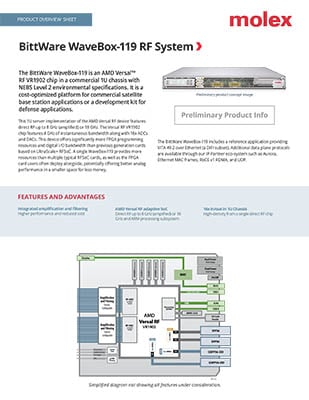
WaveBox-119 Block Diagram, Product Overview Sheet, and Specifications
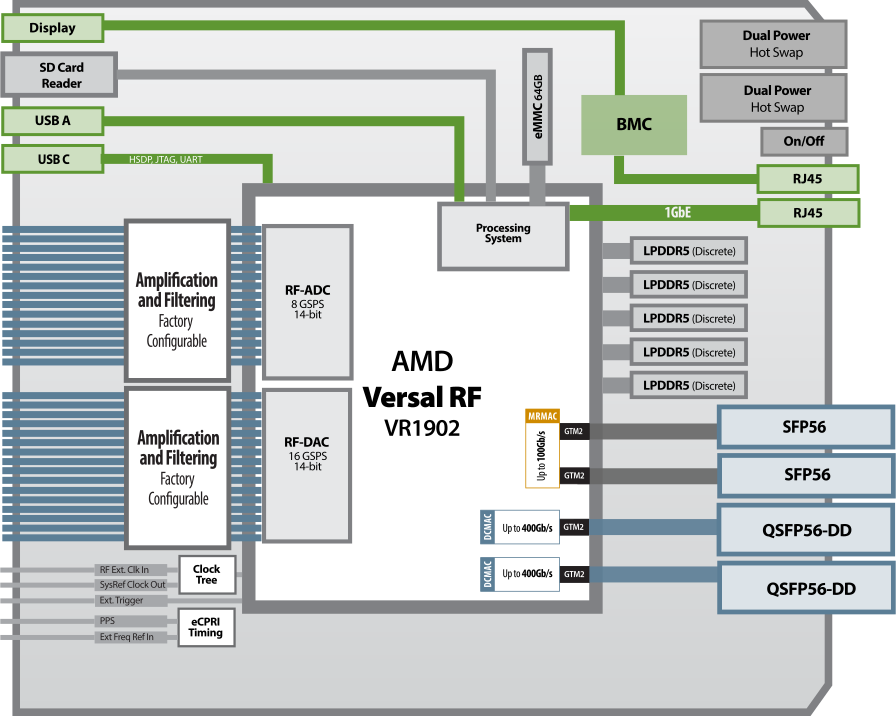
System Specifications
RFSoC
- AMD Versal RF
- VR1902 (8 GSPS)
- 核心速度等级-2
Processing Subsystem (PS)
- Application Processing Unit Dual-core Arm Cortex-A72 MPCore
- Real-Time Processing Unit Dual-core Arm Cortex-R5F MPCore
模拟
- 16x 8 GSPS 14-bit ADCs
- Standard ADC config is 500 Mhz to 3.5 Ghz with bandpass filters and +22 dB of gain
- Wideband build option provides -3 dB gain from 10 MHz to 8 GHz (default)*
- Max input power +15 dBm
- 16x 16 GSPS 14-bit DACs
- The standard DAC config is 500 Mhz to 7.5 Ghz with bandpass filters and +22 dB of gain at max output power of +15 dBm.
- Range of +15 to +10 dBm (this level is a function of frequency)
Constrained by a 7.5 GHz LPF in 1st Nyquist zone (FL3)
- High-band build option provides 20 GHz balun and no amplification
- 可编程时钟
- 外部参考和触发器
- Can inject a 10 MHz reference and power into all ADC and DAC channels
- Reference clock frequency locked but not
phase aligned (i.e. at reference frequency
of 10 Mhz, the phase shift between each
adjacent port will be approximately 0.1
degrees) - Can inject a DC bias into all ADC and DAC
channels at up 12 volts and 500mA each - All ADC and DAC channels are equal in both
phase and amplitude, within a modest tolerance
- 16x 8 GSPS 14-bit ADCs
* The Versal RF chip supports much higher frequencies. The WaveBox-119 Wideband is constrained by the balun and connector system. Higher band support is possible in special orders.
Front I/O Ports
- 4x ganged 8-wide, smooth bore SMPM connectors for 16x ADCs and 16x DACs
(Molex pigtails with SMA breakouts available) - 5x SMB for clocks and triggers
- USB-C for programming
- USB-A for the ARM PS
外部存储器
- 5x banks of LPDDR5
- Each bank 32Gb in density (2chx16) @ 8533 Mb/s; total memory bandwidth 170.7GB/s
- Each bank can be individually assigned between PS and PL
Rear I/O Ports
- 2x QSFP56-DD cages connected to 2x 600G Ethernet MACs (DCMAC); each supports 4x 100GbE, 2x 200GbE or 1x 400GbE
- 2x SFP56 cages sharing 1x 100G Ethernet MAC (MRMAC); each cage can support 50/25/10GbE
- RJ-45 for the BMC
- RJ-45 for the ARM PS
- On/off switch
电气
- 2x hot-swappable power supplies
- 功率耗散取决于应用
Import/Export
- Exports of this system from the US will require a license for some countries
形状系数
- 1U chassis
- NEBS Level 2 compliant (not formally certified)
rPv7
对价格或更多信息感兴趣?
我们的技术销售团队随时准备提供可用性和配置信息,或回答您的技术问题。
"*"表示必填项目